
Best Stock Trading Apps in Canada

After two decades of DIY investing, I’ve had a front-row seat to the evolution of stock trading apps in Canada. Canadian investors had very limited options when I first launched Million Dollar Journey. The big banks dominated the market, trading fees were high, and mobile trading platforms were clunky and felt unreliable. Executing a stock trade from your phone was more frustrating than functional.
Fast forward to 2026, and the landscape looks completely different. Fintech disruptors have transformed the Canadian investing space, forcing traditional brokerages to modernise. Today’s top Canadian stock trading platforms offer quick and easy account setup, zero-commission ETF trading, intuitive mobile interfaces, and powerful tools designed for both beginners and experienced investors.
While I still prefer using a desktop platform for in-depth research and portfolio management (which I cover in our Best Online Brokers in Canada comparison), here I’ll specifically compare their mobile apps. Read below to find out how easy they are to navigate, research investments, monitor a portfolio, and place a trade from your phone.
Top 6 Canadian Stock Trading Apps

 4.9 / 5
100% Free
 4.4 / 5
100% Free
$0
 4.2 / 5
$9.99 (first 100 trades free + Free trading on TD ETFs)
$0
 3.8 / 5
Free
$0
 3.5 / 5
Tiered between $1 to 0.5% per trade
$0
No Available Promotion
 3.2 / 5
$6.95 per trade with 203 free ETFs
$0
How we Compare Mobile Trading Apps
My personal testing comes from the Android side of the fence (Samsung user here), but several of our MDJ team members are iPhone loyalists as well. When comparing Canadian mobile trading apps, I focus on the features that actually make a difference when investing from your phone.
I also reviewed each brokerage’s current mobile platform documentation, tutorials, and publicly available videos and screenshots to see how the latest versions compare. More specifically, I look at the following factors when picking the best Canadian trading apps:
- Ease of use: How simple is the app to use? Can you easily find your portfolio or perform basic actions?
- Loading speed & Overall tech: A good mobile app needs to be fast and bug-free.
- Trading experience: How straightforward or complex are order entry and review?
- Mobile research: Quotes, charts, fundamentals, news, watchlists and alerts.
- Advanced functionality — Option trading, advanced orders, after-hours trading, F/X accounts and more.
- Reliability and user feedback: Current App Store/Google Play feedback and recurring complaints.
- Cost: Trading commissions and app-related costs.
- Overall brokerage quality: You might notice rankings are different than our overall best brokerage rating – That’s still important, but the focus here is on the actual mobile product first.
Good to Know: Mobile Convenience & Impulsive Behaviour
Being able to trade instantly from your phone isn’t always an advantage. Research into brokerage push notifications found that certain stock-price alerts increased retail trading by at least 25% during the 15 minutes following the notification. Another study found that trades made within 24 hours of receiving stock-related push notifications involved 19 percentage points more leverage, with the effect particularly strong among younger and less-experienced investors.
That doesn’t mean you should avoid mobile investing. But if you’re a long-term investor, features designed to keep you constantly checking prices and reacting to market movements aren’t beneficial. I generally prefer an app that makes it easy to manage my portfolio without encouraging me to trade simply because the market moved today.
Best Overall Stock Trading App: Qtrade
Qtrade’s app is fast, easy to use and navigate, and includes top-rated educational and research tools. The mobile app gives users access to extensive information on major North American exchanges and real-time quotes for individual stocks. It also uses the latest encryption technology for enhanced security features.
“Qtrade excels in every area – especially in customer service.”
Mark Brown, Investing and Rankings Editor for MoneySense
Qtrade’s app puts your account balance, holdings and portfolio performance front and centre, while individual stock pages combine real-time quotes with company information, news and research. You can also build watchlists, view your portfolio allocation, access analyst research and place stock, ETF and options trades directly from the app.
It’s not trying to pack in the sheer number of trading tools you’ll find with IBKR, but that’s part of the appeal for me: Qtrade gives plenty of information to make a decision without turning the mobile experience into a professional trading terminal.
The team of writers at MDJ has made no secret of our love for Qtrade, consistently ranking it as our top online broker in Canada over the years. Qtrade has consistently rewarded our faith and support by innovating impressive new details and reinvesting in elite customer service, plus outstanding user experience.
Then, to take it up another level, in late 2025, they went to 100% free trades and no annual account fees.
- Minimum Balance: $0
- Trading Fees: 100% Free, including the buying & selling of ETFs and stocks
- Account Options: TFSA, RRSP, LIRA, RESP, RRIF, FHSA, LIF, margin, non-registered
- Current Promotion: $100 Free + Up To $5,000 Cash Back
- Full Review: Qtrade Review
MDJ Verdict: Our top overall trading app for most Canadian investors. Combines an easy to use mobile experience with excellent research tools and commission-free trading.

Best 2026 Broker Promo
Up To $5,000 Cash Back + $100 Free Sign Up Bonus
Open an account with Qtrade and get the best broker promo in Canada: $100 + 5% cash back when you invest $1,000!
The offer is time limited - get it by clicking below.
Must deposit/transfer at least $1,000 in assets within 60 days. Applies to new clients who open a new Qtrade account by January 5, 2027. Qtrade promo 2026: CLICK FOR MORE DETAILS.
Runner-up Canadian App: Questrade
Questrade’s basic mobile app (formerly Questmobile) features an intuitive interface, streamlined design, and biometric login. Questrade built the app with speed and ease of use in mind, and it shows.
The redesigned Questrade app organizes everything into four main tabs: Home, Discover, Manage and Search. Home displays your accounts, equity, profit/loss and positions, while Discover combines market news, sector data, analyst insights and upcoming events.
Questrade’s stock trading app also features Learning Mode, which allows investors to access definitions, stock and ETF information, and real-time snap quotes (a step up from the previous 15-minute wait). Additionally, the ability to open dual currency (CAD/USD) accounts for free is a major plus.
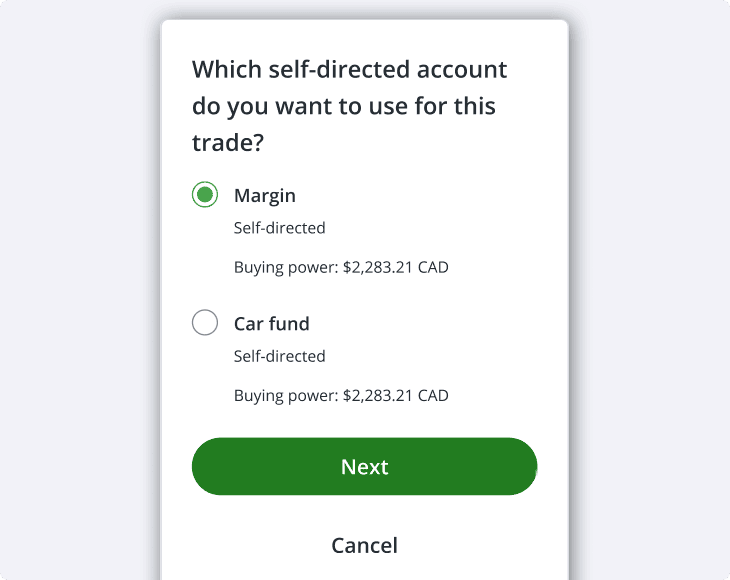
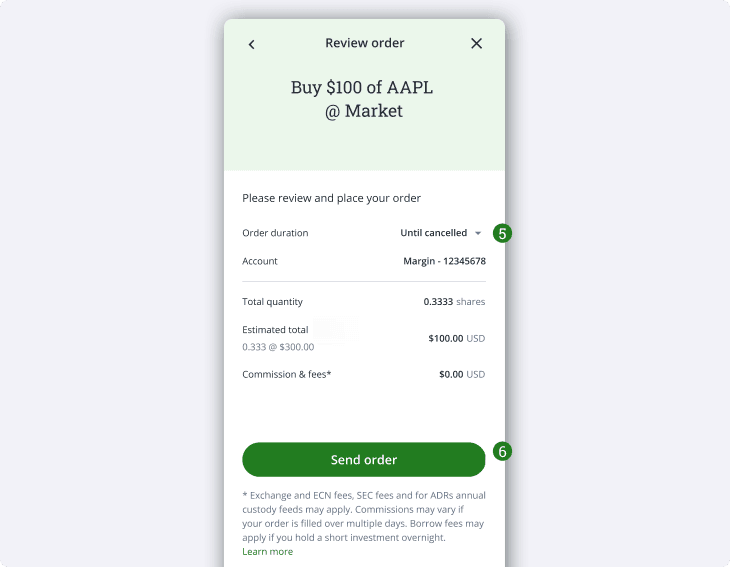
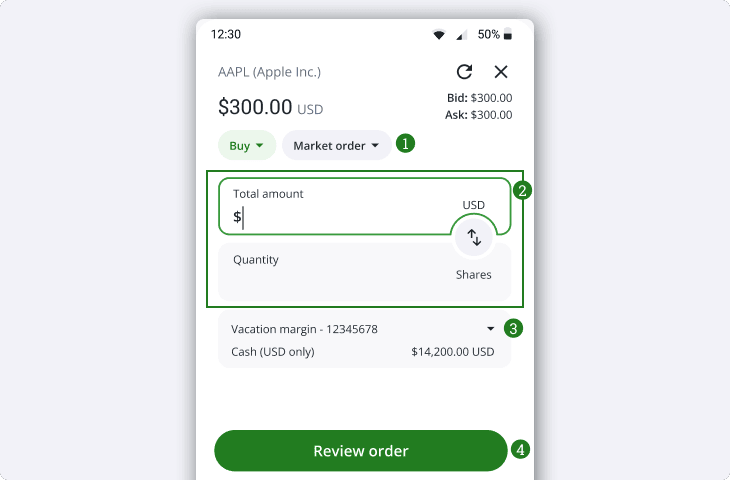
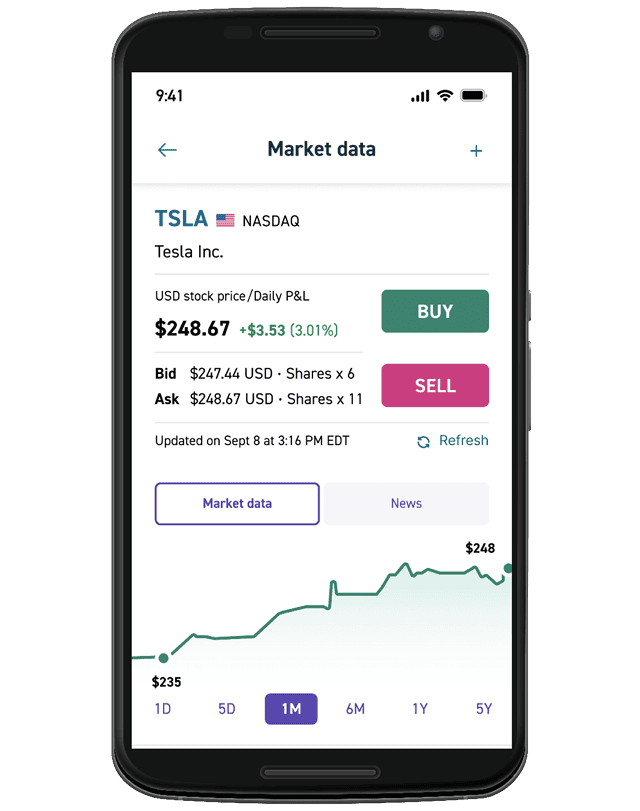
Questrade has another mobile app, Questrade Edge Mobile, which is a more advanced app: “designed by active traders for active traders”. Additionally, they also offer the Questrade FX app for users who deal with currency conversions on a regular basis.
Questrade’s app gets a lot of positive user reviews for the way it looks, and as far as mobile trading apps go, it’s an excellent choice. That said, high mutual funds fees, inferior research and learning tools, and an unattractive promo keep it out of our top spot. For a more detailed comparison, read our Questrade vs Qtrade article.
- Minimum Balance: $0
- Trading Fees: Free stock trading and free to buy and sell ETFs
- Account Options: TFSA, RRSP, RESP, FHSA, LIRA, RIF, LIF, non-registered, corporate, trust, margin
- Current Promotion: $50 Free Bonus
- Full Review: Questrade Review
MDJ Verdict: A strong all-around trading app and top alternative to Qtrade. The redesigned app is a significant improvement, while free CAD/USD accounts are useful for investors who regularly buy U.S. stocks.
Best Big Bank Investing App: TD Direct Investing & TD Easy Trade
TD is a unique option because it gives investors two distinct mobile options. TD Direct Investing provides the fuller brokerage experience, while TD Easy Trade is a simpler mobile-first product aimed primarily at newer investors.
While TD’s usual stock trading rates are among the highest of all the DIY brokerages at $9.99/trade, TD Easy Trade gives users 100 free stock trades a year before those fees kick in. Both apps also offer unlimited TD ETF trades.
That means that if you’re just starting out and want to stick to a big bank stock trading platform, TD Easy Trade gives you the chance to get used to things without incurring any fees. There aren’t any account fees either, so it gives users a nice little grace period where they pay nothing at all.
There are a couple of catches with TD though. It only offers RRSP, TFSA, FHSA and Non-registered accounts and users can only trade TD ETFs or stocks for free. TD is also limited to the Canadian and U.S markets.
If you want to set up any other kinds of accounts or trade any other kinds of assets, this isn’t the app for you. But if you’re just getting started and don’t mind the comparative lack of options, TD Easy Trade is worth a look.
- Minimum Balance: $0
- Trading Fees: 100 free stock trades (then $9.99/trade), unlimited free TD ETF trades
- Account Options: RRSP, TFSA, FHSA, Non-registered
- Current Promotion: Up To 3% Cash Back
- Full Review: TD Direct Investing Review
MDJ Verdict: Our favourite big-bank option, especially for investors who want strong research tools or already bank with TD. Easy Trade is better for beginners, while Direct Investing provides a more complete brokerage experience.
Best for Beginners: Wealthsimple Trade
We can say with confidence that Wealthsimple Trade has the lowest fees of any stock trading app on this list. While it offers commission-free trading for both stocks and ETFs, just like Qtrade and Questrade, Wealthsimple Trade is unique in that you can also buy and sell options for $0. The pricing is, frankly, hard to beat.
That being said, when you get something for free you need to expect a trade-off since Wealthsimple takes a much more stripped-down approach. The app is built around a simple portfolio view and search function, with individual investment pages providing price charts, basic company info, and the option to buy or sell without navigating through a traditional brokerage interface.
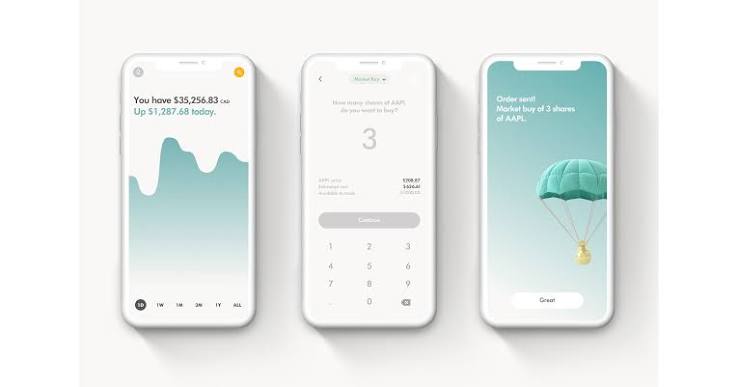
Wealthsimple has added considerably more functionality over the years, including price alerts, fractional shares, options and recurring investments, but research remains relatively light compared with Qtrade or TD. That simplicity is a big reason I think the app makes sense for beginners, but investors who like digging into analyst research and detailed market data may quickly find themselves looking elsewhere for information.
If you’re looking for a stock trading app that lets you play around with small sums without worrying about blowing your entire balance on fees that can cost up to $9.99 per trade, Wealthsimple Trade is a great choice.
Minimum Balance: $0
Trading Fees: $0
Account Options: TFSA, RRSP, RRIF, RESP, FHSA, LIRA, non-registered, corporate accounts, margin accounts. USD accounts require a $10 monthly subscription.
Current Promotion: $25 Cash Bonus.
Full Review: Wealthsimple Trade Review
MDJ Verdict: The best app on our list for beginners who value clean, easy to use platform over advanced investing tools. Wealthsimple has added plenty of features, but its research capabilities still lag behind.
Best for Advanced Users: Interactive Brokers
IBKR’s mobile app was built with advanced investors in mind, and the average Canadian user might find it confusing or intimidating. That said, once you get used to it, you get access to a much broader range of markets, assets and trading tools.
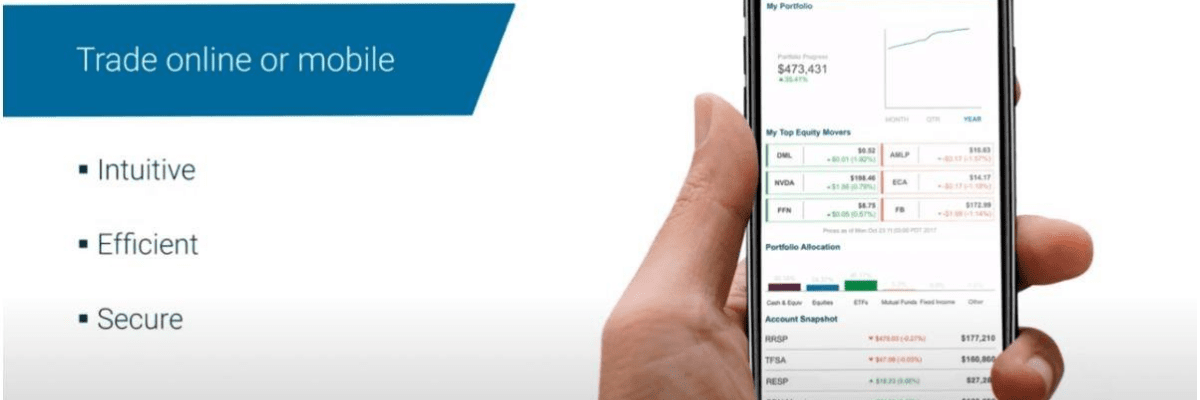
IBKR Mobile lets you access stocks, options, futures, currencies and other investments across more than 170 markets, with advanced order types, options chains, detailed charts and customisable watchlists all built in.
The order ticket alone offers substantially more control than most Canadian investors will ever need, which is exactly why IBKR makes sense for active and advanced traders but can feel excessive for someone who simply wants to buy an ETF every month. Its excellent foreign-exchange rates and multi-currency capabilities are another major advantage for investors who regularly trade outside Canada.
<screenshots>
The platform is well known for its world-class educational and research tools – although I would argue Qtrade and TD give it a run for their money at the very least. What I do really like is their fully customisable dashboard – giving users maximum flexibility and control.
- Minimum Balance: $0
- Trading Fees: Tiered between $1 to 0.5% per trade.
- Account Options: Non-registered accounts (both CAD and USD), joint Accounts, margin Accounts, RRSP, TFSA, FHSA, informal trust, formal trust
- Current Promotion: None
- Full Review: Interactive Brokers review
MDJ Verdict: The best choice on our list for advanced and active traders. IBKR offers considerably more trading functionality and access to international market access.
Lowest Fees for a Big Bank Stock Trading App: CIBC Investor’s Edge
The main advantage of CIBC Investor’s Edge doesn’t come from the app itself. With trading fees at $6.95/trade they are by far the cheapest option out of any of the big banks. If you are already an existing CIBC client, linking the account to the app takes only a few minutes.
Through the CIBC Mobile Wealth app, Investor’s Edge users can access quotes, charts, watchlists, market news and stock research, as well as place and monitor trades from their phone.
So, if your priority is convenience and an above average app is all that’s required – I would certainly give this one serious consideration. Even though the tools provided by the platform aren’t exceptional, you’ll get all the data you need and be able to easily make any trade you like.
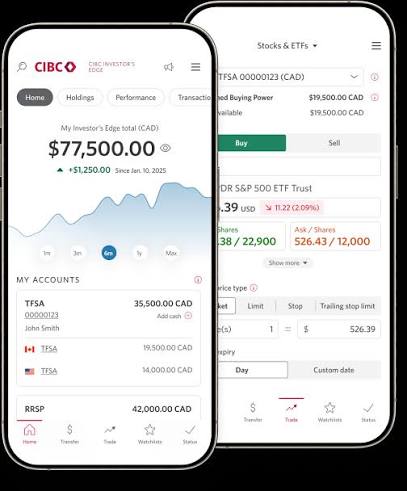
The reasons I am mostly down on CIBC’s mobile trading platform are their relatively poor user experience and customer service. That’s not to say using the app is a terrible experience at all, but it’s less intuitive to navigate and sometimes takes a long time to load. The subpar customer experience is reflected by their current App Store reviews – 3.6 on the Apple store and a 3.5 star rating on Google Play.
- Minimum Balance: $0
- Trading Fees: $6.95/trade + 203 different ETFs for free
- Account Options: Non-registered accounts, margin Accounts, RRSP, TFSA, RESP, RRIF, LIF, LIRA, informal trust, investment club, trust or estate
- Current Promotion: 203 Commission-Free ETFs + Free Fractional Trading
- Full Review: CIBC Investor’s Edge Review
MDJ Verdict: A solid choice for existing CIBC clients who value convenience and want lower trading fees than most big-bank competitors. The app covers the essentials, but there’s little to make it stand out and it’s often too slow.
Best Canadian Stock Trading App for iPhone and Android
Most of Canada’s best stock trading apps have solid user reviews across both Apple and Android devices. All of them offer the same basic features and core functionality across all devices. No matter which app or device you choose, you can expect the following to be available:
- Biometric login
- Real-time quotes
- Watchlists
- Price alerts
- Advanced charts
- Advanced order types
- Portfolio analytics
- Market news/research
Where apps differ is on more fringe features such as fractional share trading, option trading fees and customisable dashboards. That’s a big part of the reason why I put much more weight into actual user experience, customer support, and feedback provided by actual clients.
| Mobile Trading Platform | Google Play Rating | Apple Store Rating |
| Qtrade | 3.9/5 | 4/5 |
| Questrade | 4.6/5 | 4.7/5 |
| TD Easy Trade | 3.8/5 | 4.4/5 |
| Wealthsimple Trade | 3.3/5 | 4.6/5 |
| Interactive Brokers* | 4.5/5 | 4.5/5 |
| CIBC Investor’s Edge | 3.4/5 | 3.6/5 |
My partner and I both use Qtrade, which happens to be MDJ’s top pick for 2026. I’m firmly in the Android camp, while she’s an iPhone loyalist – and neither of us has run into any issues with the Qtrade app.
Everything works as expected, and the experience is equally smooth on both platforms. Admittedly, we didn’t choose Qtrade because of their app (but rather everything else they bring to the table – you can see my Qtrade Review for more details).
Trading App vs Online Brokerage: What’s the Difference?
For the average user, today’s mobile apps provide nearly all of the core functionality needed to manage a portfolio. Desktop platforms still tend to offer deeper research and, in some cases, advanced trading functionality that isn’t available through the standard mobile app
That said, some of these brokers do separate their services between multiple apps. Questrade Edge gives you more data options and better access to U.S markets, so it’s a better choice for active traders – but these extra features also cost $9.99 a month.
On the other hand, TD Easy Trade has lower fees than TD Direct Investing such as no maintenance fees and 100 free trades for example. But the trade-off is you don’t get to trade some basic products such as mutual funds, options or bonds (all available on other apps on our list) if you choose the mobile platform.
Best Free Stock Trading App For Canadians
It should be noted right off the bat that there is no such thing as a completely free stock trading app. Sure, you might not pay anything upfront for a specific investing platform app, and you might even avoid per-trade fees. However, if you aren’t paying directly, then you can be sure that you’re paying in some other way.
Wealthsimple remains a strong option for commission-free trading, particularly for beginners who value a simple mobile experience. However, Qtrade and Questrade now also offer commission-free stock and ETF trades, so Wealthsimple no longer has the edge it once did. Choosing between them comes down to research tools, account features, customer service and the overall investing experience.
To view other options available to Canadians, see our free stock trading page.
Qtrade is not only our top pick, but repeatedly places above Questrade in rankings by third-party sources such as The Globe and Mail, and Moneysense. Plus, Qtrade’s promotions are the best we’ve seen.
For a thorough explanation of why Qtrade comes out on top, check out our head-to-head Questrade vs Qtrade comparison.
Good to Know: $0 Commissions Don’t Mean $0 Cost
Commission-free stock and ETF trades have become increasingly common in Canada, but that doesn’t necessarily make a trading app free to use. For example, currency conversion fees can be particularly important if you regularly buy U.S. stocks. Additionally, some platforms charge extra for USD accounts, mutual funds trades, options trading, market data and other premium features.
For someone buying mostly Canadian-listed stocks and ETFs, these costs might barely matter. If you frequently trade U.S. securities or use more advanced features, they can matter much more than a $0 trading commission.
Canada’s Best Stock Trading Apps FAQ
Which Canadian Stock Trading App is Best For You?
In 2026, the best stock trading apps in Canada deliver a polished, reliable mobile investing experience with low fees and intuitive design. Platforms like Questrade and TD Easy Trade are consistently praised for their clean design and ease of use, especially for newer investors. Interactive Brokers is the clear option to consider if advanced trading tools and access to international markets are your priority.
For most Canadian DIY investors, however, Qtrade remains my top overall pick. Its mobile app strikes a strong balance between ease of use and access to research and investing tools, while the brokerage itself now offers commission-free stock and ETF trading with no annual account fees.
My partner and I also use Qtrade ourselves, so it’s the platform on this list I’m most familiar with from day-to-day use. We didn’t originally choose it because of its mobile app, but I’ve found that the app does everything I need it to do without getting in the way.
Ultimately, I wouldn’t choose an online broker based on its mobile app alone. Fees, account options, customer service, research tools and overall brokerage experience still matter more. If you prefer comparing the complete package rather than just the mobile apps, take a look at our comparison of the Best Online Brokers in Canada.







I disagree with the statement “nonexistent customer service” in terms of Wealthsimple support. I moved from Questrade to Wealthsimple mostly for the 1% cash back offer. Having used it for a year, it has some limitations vs Questrade but support certainly isn’t one of them. I mostly use the online chat support, which is responsive and helpful. Have emailed them as well have received prompt service.
Now that my cash back offer is done, I’ll likely move RRSP and LIRA accounts back to another broker that supports Nordbert’s Gambit as those are the accounts I trade USD in. My TFSA will stay with Wealthsimple as it’s all CAD and gives me the generation perks with Wealthsimple (higher interest, and free 2% cash back Visa).